Pages

Monday, January 5, 2009

Get Organized, Moms!

If lack of time is keeping you from reaching your income goals or starting projects you know will prove to be lucrative, it's time to get organized. We all have the same number of hours -- you just need to stop wasting time and make sure you accomplish the important things.

How many times have you wasted an hour or two online and then realized you didn't get even one new article written? I know it's happened to me. Yeah, you have to reply to blog comments and check out your friends' articles ... but first things first. Break down your goals into daily to-do lists and add them to your planner. If you're a WAHM, your planner should be chock full of things -- daily chores, menu plans, appointments, kids activities, writing deadlines and the like.

I used the Motivated Moms system for the last few months of 2008 and just purchased the 2009 version to keep me on track for the new year. It rocks!

Here's a sample page of my Motivated Moms 2009 Full Size Planner: (click image to enlarge):


It's basically the Fly Lady house cleaning system broken down into daily checklists, with my self-added writing goals and daily appointments all in one place. If you have trouble balancing it all, resort to this simple checklist system. It rotates your chores for you, incorporating daily, weekly, monthly and seasonal tasks all in one simple planner system.

I'll be relying on my Motivated Moms planner to make sure I keep up with my writing goals for the year and stay on top of the house. I love writing, but I don't love housework. Knowing what I have to do each day simplifies things.

What's your favorite organizational tool or tip?

Top eHow article hits $1,000 in Revenue

Thank goodness I stepped out on a limb just over a year ago and decided to experiment by writing directly for eHow. At the time, I was suggesting how-to titles for a content company contracted by Demand Media to provide articles for the eHow.com site. For each topic they approved and I wrote, I was paid a flat fee: $11.

Of course, for a stay at home mom who could crank out 2-3 an hour at times, the hours rate wasn't bad -- and it was better than what I was earning grading high school English papers at night. So I certainly wasn't complaining. But ... what if I could retain the rights to my work and possibly earn more submitting directly to eHow? I decided to give it a shot after eHow's Rich stopped by the WAHM writer's forum trying to recruit eHow members.

My first article has earned hundreds of dollars. One of the articles I wrote a month in to my experiment has now crossed the $1,000 mark. Wow. (Click image to enlarge. Some details removed.)

Is that not awesome? Here's hoping a few of the others cross that mark in 2009. And if you still needed convincing, residual income is the best business model for writers, in my opinion. In 2009, I'll be doing all of my writing for residual income streams. It took me a full year to transition from writing for pay, per article, to writing only "for myself" in residual income models.

I'm not just turning my back on $11 articles, or the $30 articles I was writing for another site. I charged $150 each for blog post articles in 2008 for a software company, and could have continued to write for them ... but my heart wasn't there. I only have so many hours to write, and I want to spend them building up long-term income sources that will continue to earn money for my family months and even years down the road.

Of course, since my income is a secondary income for our family, and I had to replace a part-time income and not a full-time one, it took less time, perhaps, than it would have otherwise. However, if you have more hours to devote to building up residuals, perhaps you can get there even more quickly.

In the coming year, it's my goal to build up a full-time residual income ... working very part-time, of course, and using the foundation I already have in place.

What are your writing income goals for 2009?

Sunday, January 4, 2009

Maximize eHow Earnings with Affiliate Links

Do you earn income from affiliate products you recommend in your eHow articles? If not ... it's time to start. I encourage you, if you have a library of eHow articles, to take some time to add affiliate links or links to your other sites and blogs, under the Resources section of your articles. Don't waste time on social promotion, Digging and Stumbling articles that really aren't going to appeal to those social communities. Instead -- maximize your earnings potential by adding another residual income revenue stream to your content.

For this post, I'm going to assume you've joined the affiliate programs and can navigate them enough to generate the code for the products. Here's how to add affiliate links to your eHow articles for several of the affiliate programs I use.

Amazon.com

To build affiliate links to Amazon products, choose the "text only" option, to simplify the HTML code you'll see. While the program generates HTML code, you are just after the link -- you can NOT copy and paste the entire HTML code into your eHow article or Resources section.

Here's what it looks like when you're getting the affiliate code for Amazon products (click to enlarge):
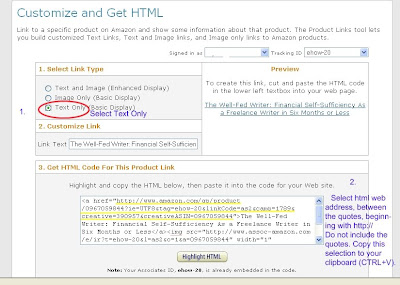
Select the URL that begins http:// and is located between the quote marks. Do not inlcue the quotes, but make sure you have highlighted every character in between. Copy this web address to your clipboard by keying CTRL + C or by right-clicking your highlight link and then selecting "Copy" or "Copy to clipboard" in the menu that appears.

You now have the affiliate code for the product you wanted to recommend -- and if someone buys it form your link, you'll get credit -- and money. Scroll down to "Putting it All Together," below, to see how to add this link to your eHow articles.

CJ.com

Commission Junction is a great affiliate network, and I'm averaging around $100 a month from affiliate sales through CJ, even with a very low number of links online. I'll be adding more CJ links to my articles and sites in the coming months.

After choosing the product or site you wish to promote, choose "Get HTML" for the link you want. You'll see the following dialog box:
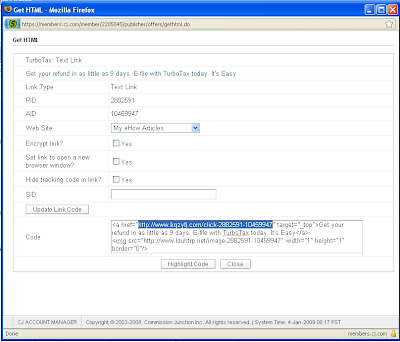
Select the affiliate link between the quotes. You'll use this in your eHow article ... scroll down to "Putting it All Together" to see how.

eJunkie

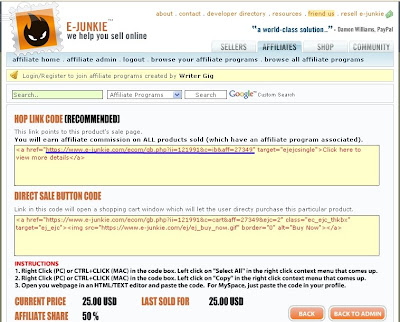
My ebook is hosted with eJunkie, and there are scores of information products on the site that offer affiliate programs. (If you're not an eHow ebook affiliate, you should be! You can earn $12.50 per sale by promoting my ebook in eHow-related articles, money-themed how-to's and even your blog. )And then you'll have the code:


Select only the link between the quotes, which in this case I have underlined in blue.

Putting it All Together: Adding the affiliate links to eHow articles

After generating your HTML code, selecting the appropriate link, and copying it to your clipboard, you're ready to add the link to your eHow article. Open the article for editing, and scroll down to the last few sections of the Write Article tool.

Screen shot of the eHow Write Article tool, to illustrate (click to enlarge):
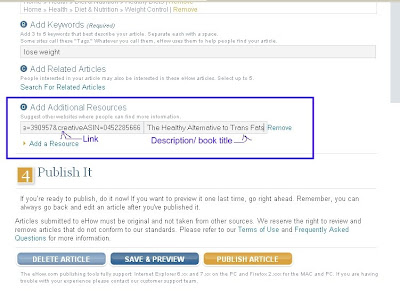
Paste the affiliate link in the "link" section and then write or copy and paste a descriptive phrase about the product or site. Keep it short and simple. Hit publish. Now view your article, and click the link to make sure you added it correctly.

From the outside, your affiliate link simply looks like a helpful resource (which it is):
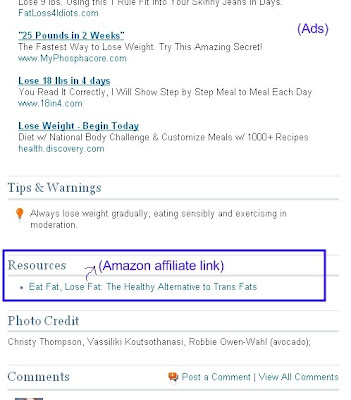


There you have it. Easy-peasy, right?

Don't expect huge overnight earnings ... the Resources section is so far down that most readers never see it. But some, intrigued by the information in your articles and wanting to know more, keep scrolling and see your resources. Some click, some don't. Some buy the products you recommend. Most don't.

But just like the adsense clicks, day in and day out, it adds up over time. A few minutes to build a link can translate into many dollars over time. My best-performing link has earned me hundreds of dollars over the past few months. This is passive income at its best -- enjoy it.